Plaid and DigiFi: Bank-Verified Data in Every Lending Decision
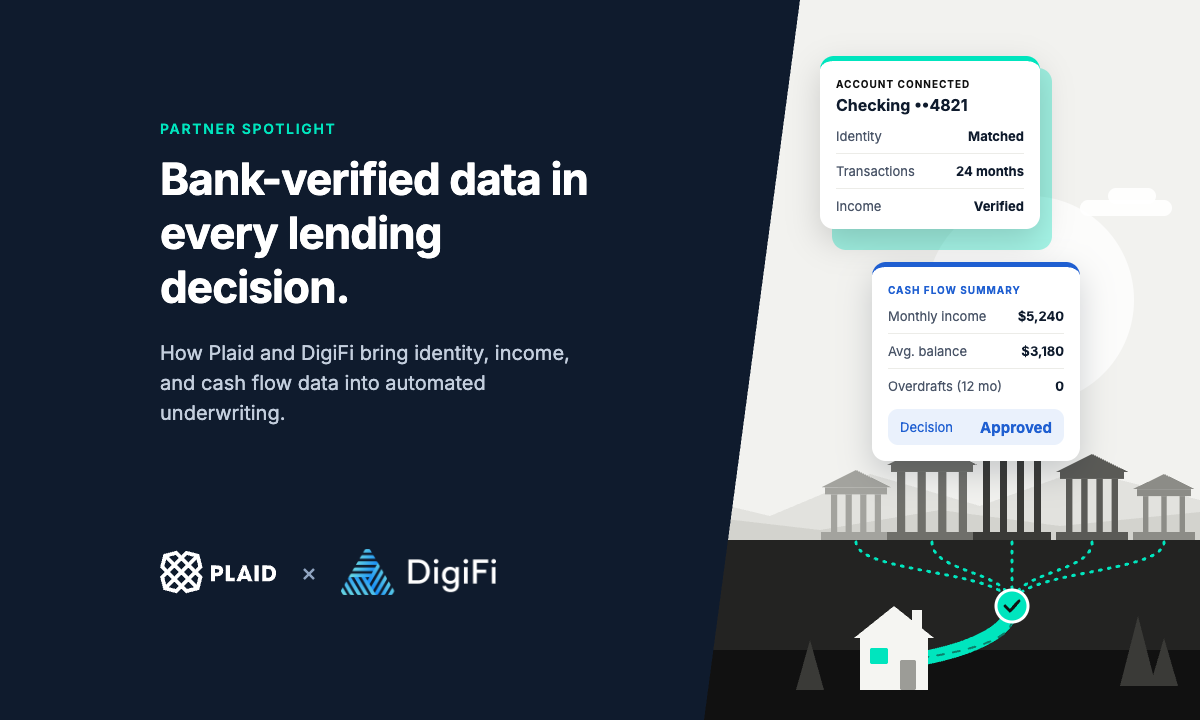
How lenders use Plaid in DigiFi to replace bank statements and pay stubs with consumer-permissioned identity, income, and cash flow data in automated underwriting.
Two applicants apply for the same $15,000 personal loan on the same afternoon, and both have a 660 credit score. One is a salaried hospital employee with a steady paycheck. The other runs a small landscaping business, is paid by a dozen clients on no fixed schedule, and keeps a healthy cushion in checking. To a credit report, they look almost identical. Their bank accounts tell two different stories.
For years, the only way to read those stories was to ask for documents: two bank statements, pay stubs, a copy of a driver’s license. The applicant leaves the application to find the files, and some never return. Underwriters read PDFs line by line. And fraudulent statements and pay stubs have become easier to produce and harder to spot.
Consumer-permissioned data changes that. With the applicant’s consent, a lender can see balances, transactions, income, and identity details straight from the applicant’s financial institution, and put that data to work in its decision rules. For most lenders, the question is no longer whether this data is useful. It is which data to request, at which point in the application, and how to use it consistently and compliantly.
DigiFi is an official partner of Plaid, whose network connects to more than 12,000 financial institutions. Lenders on the DigiFi loan origination system can add Plaid’s Link widget to their borrower portal without writing code, and connect 14 Plaid integrations, from transactions and identity to income and Plaid Check consumer reports, directly to automated underwriting. Existing DigiFi customers can typically go live in one to two weeks.
From Uploaded Documents to Connected Data
Traditional Process | Plaid Connection | |
|---|---|---|
Getting the data | Manually uploaded | Digital account connection |
Time | Multiple days | A few minutes |
Data quality | Read and re-keyed by hand | Structured data auto-mapped |
Fraud exposure | Fraud hard to detect | Data direct from source |
Use in decisions | Mostly underwriter judgment | Automated rules |
Keeping it current | A new set of documents | Quick re-pull of data |
Documents still have a place. Not every applicant will connect an account, and connection quality varies by institution. Most lenders make connected data the default path and keep document upload as a fallback, with both configured in the same DigiFi workflow.
How the Integration Works
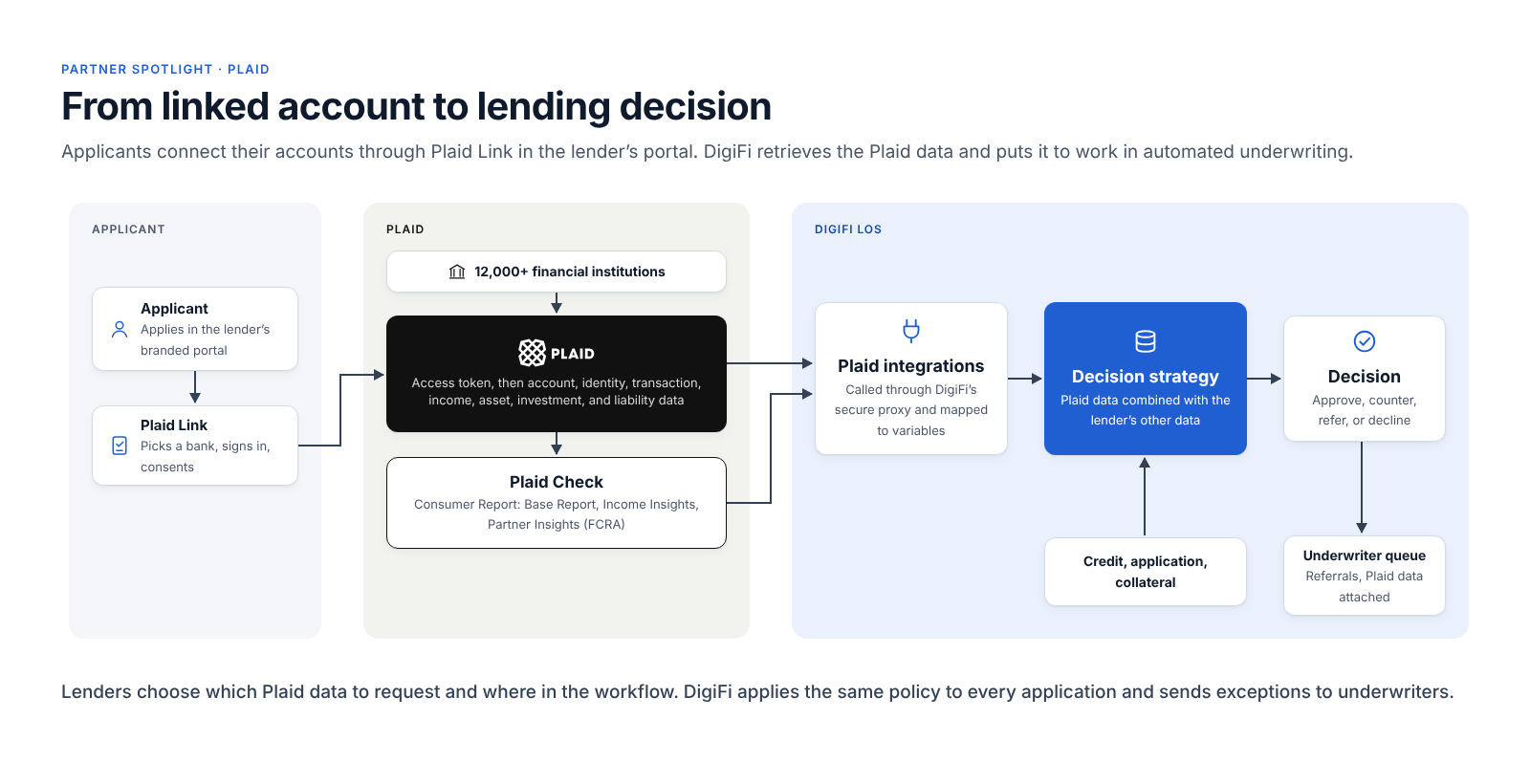
The integration has two parts. Plaid Link, a widget built into DigiFi’s Borrower Portal, is where the applicant connects an account. Plaid data integrations, added from the DigiFi Marketplace, retrieve the data and deliver it to the lender’s decision rules.
- The lender connects its Plaid account. In the DigiFi Marketplace, the lender enters the Client ID and Secret from its own Plaid account. DigiFi checks that the credentials are valid.
- Plaid Link is added to the portal. In the portal’s page setup, the admin places a Plaid Link element on the page for the right step of the application. It then chooses the Plaid products to request, how many days of history to request, and, for consumer reports, the permissible purpose.
- The applicant connects an account. Inside the lender’s digital portal, the applicant selects a financial institution, signs in through Plaid, and consents to share the data. Plaid returns an access token to DigiFi. The lender never sees the applicant’s login credentials.
- DigiFi retrieves the data. At the configured workflow step, DigiFi calls each Plaid integration through a secure proxy using that token. Consumer reports can be generated automatically as soon as the applicant finishes the Link flow.
- The lender’s rules decide. Plaid data lands in the application’s variables, where decision strategies use it alongside credit bureau, application, and collateral data.
- Exceptions go to underwriters. Referred applications reach an underwriter with the Plaid data already attached.
Lenders with a custom borrower portal can run Plaid Link in their own front end and call Plaid directly from DigiFi’s data integrations.
What Each Plaid Product Adds
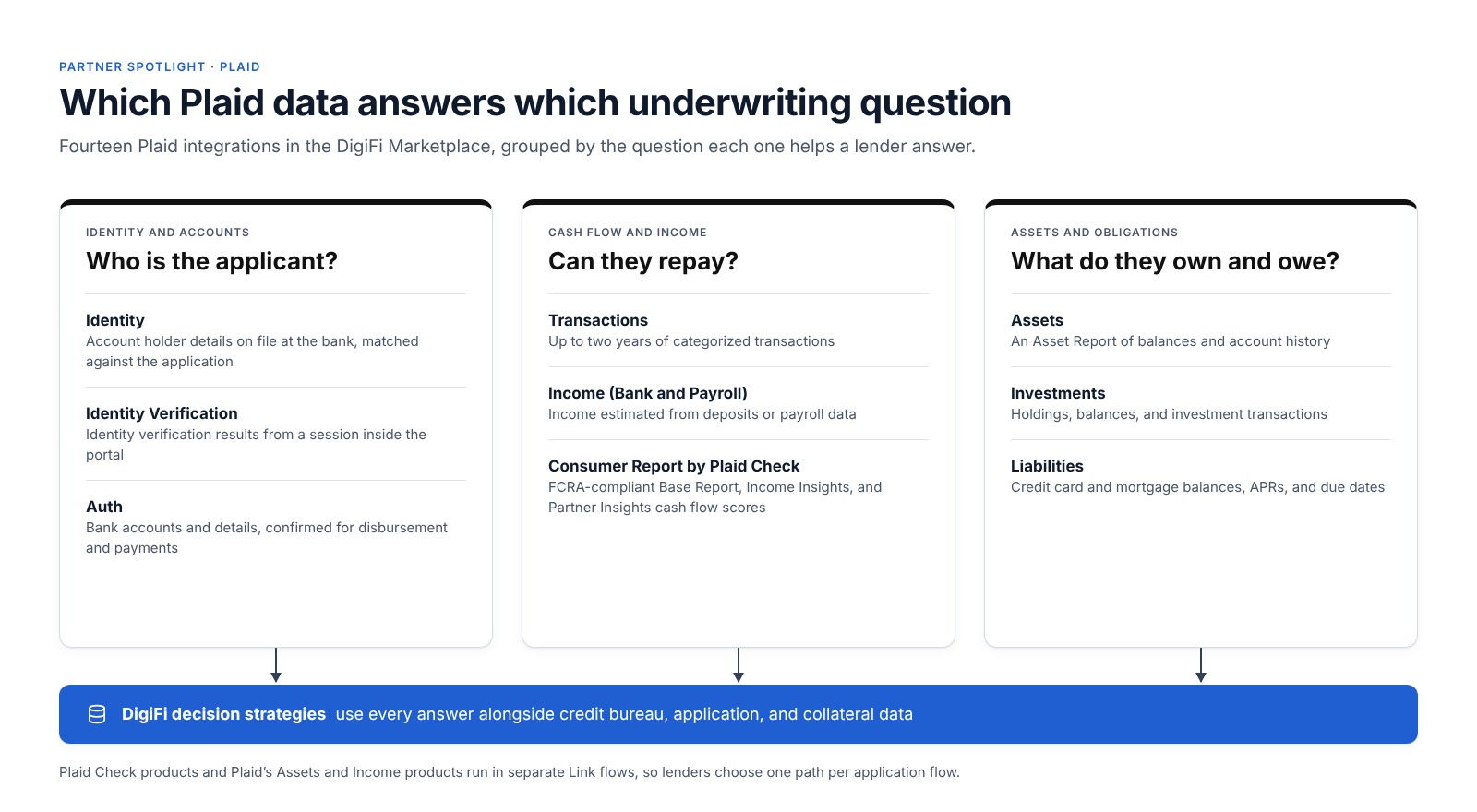
Plaid product | What it returns | How lenders use it |
|---|---|---|
Auth | The applicant’s bank accounts, with account details and balances where available | Confirm the account for disbursement and automatic payments |
Identity | Account holder information on file with the institution, such as name, email, phone, and address | Match it against the application to confirm account ownership and flag mismatches |
Identity Verification | Results and status of a Plaid identity verification session | Complete identity checks inside the portal, without sending the applicant elsewhere |
Transactions | Up to two years of transactions, with merchant and category detail | Build cash flow attributes such as income regularity, overdrafts, recurring obligations, and payments to other lenders |
Income (Bank and Payroll) | Estimated income from bank deposits or from payroll data | Verify stated income without pay stubs |
Assets (Create and Retrieve Report) | An Asset Report of balances and account history | Verify down payments and reserves, especially in mortgage and home equity |
Investments | Investment balances, holdings, and transaction history | Count investment assets toward reserves or net worth |
Liabilities | Credit card and mortgage details, including balances, APRs, and due dates | Calculate debt-to-income with current figures and identify refinance opportunities |
Consumer Report by Plaid Check | Bank account and cash flow data, including inflows, outflows, and account attributes | Underwrite on cash flow with an FCRA-compliant consumer report |
Income Insights (Plaid Check) | Income streams, income history, forecasted income, and employer details | Verify income for applicants with irregular or multiple income sources |
Partner Insights (Plaid Check) | Off-the-shelf cash flow risk scores based on de-identified deposit account data | Add a cash flow score to the decision without building a model |
Plaid offers two paths to underwriting data, and lenders choose between them for each application flow. Plaid Check, Plaid’s consumer reporting agency subsidiary, provides Consumer Report: an FCRA-compliant report with ready-made income insights and risk scores, which Plaid recommends for most new lending customers. Plaid’s Assets and Income products remain available for use cases Plaid Check does not support. The two cannot run in the same Link flow, so the choice is made when the portal step is configured.
Plaid products not yet in the Marketplace can be connected through DigiFi’s data integrations, or lenders can ask DigiFi’s support team to add them.
Designing Your Bank Data Policy
Connecting the data is the easy part. The decisions that matter are about policy:
- Where to ask. Some lenders request a connection from every applicant. Others ask only when the credit decision is borderline, as a second look, so clear approvals stay fast.
- Which data, for which product. A personal loan may need identity, income, and a cash flow score; a home equity loan, assets and liabilities. Requesting only what the policy uses keeps the applicant’s consent clear and the cost per application down.
- Which attributes drive decisions. Verified versus stated income, average balances, overdraft frequency, recurring obligations, and payments to other lenders are common starting points. Each should be validated against loan performance like any other credit variable.
- What happens without a connection. Define the fallback, such as a document upload task, for applicants who decline or whose institution can’t connect.
- Consistency and compliance. Apply the same policy to similar applicants and keep a record of the data used in each decision. When a Plaid Check consumer report contributes to an adverse action, the notice must identify Plaid Check as the consumer reporting agency, just as it would a credit bureau.
Each of these is a rule: written once, tested, and applied the same way every time in the decision engine.
Who Benefits Most
Lender type | Starting point | How they use Plaid in DigiFi |
|---|---|---|
Online personal and installment lenders | High volume, thin files, and constant fraud pressure | Identity checks at onboarding, plus Consumer Report and cash flow scores in automated decisions |
Credit unions and community banks | Deep data on existing members, little on new applicants; manual statement reviews | Verify income and accounts for new applicants, and set up automatic payments with Auth |
Lenders serving self-employed and gig workers | Irregular income that pay stubs don’t capture | Bank Income and Income Insights to verify income across sources |
Mortgage and home equity lenders | Asset and reserve verification on every file | Asset Reports, Investments, and Liabilities in one workflow |
Lenders adding a second-look program | Borderline applicants declined on bureau data alone | Request a connection only for borderline cases and decide on cash flow |
For Technology Teams
DigiFi uses the access token Link returns to call Plaid through its proxy. Each Plaid integration is a Marketplace template attached to a loan product, with response fields mapped to application variables that rules, workflows, and reports can use like any other data. Teams with a custom portal can run Plaid Link themselves, manage the connection, and call Plaid directly rather than through DigiFi’s proxy. Full details are in the Plaid integration documentation and the Plaid Link setup guide.
Getting Started
- Set up your Plaid account. Agree on products and pricing with Plaid, then copy your Client ID and Secret from the Plaid Dashboard.
- Connect Plaid Link in DigiFi. Enter your credentials under Lending Setup > Marketplace > Plaid Link.
- Add the integrations. Choose the Plaid integrations each loan product needs from the DigiFi Marketplace.
- Build the portal step. Add the Plaid Link element to the right portal page, with a document upload task as the fallback.
- Write your policy as rules. Where to ask, which data to request, which attributes drive decisions, and what happens without a connection.
- Test, then launch. Run applications end to end in Plaid’s sandbox and DigiFi’s testing mode. After launch, track connection rates, the share of applications decided automatically, and how often applicants fall back to documents.
Existing DigiFi customers typically go live in one to two weeks, and new DigiFi customers in 60 to 90 days.
Frequently Asked Questions
What is Plaid?
Plaid is a financial data network that lets consumers securely connect their financial accounts to the apps and services they choose. Its network connects to more than 12,000 financial institutions in the U.S., Canada, the U.K., and Europe.
How does Plaid work with DigiFi?
Applicants connect their accounts through Plaid Link, which is built into DigiFi’s Standard Borrower Portal. DigiFi then retrieves the Plaid data the lender has configured and uses it in the lender’s automated decision rules.
Which Plaid products are available in DigiFi?
Auth, Identity, Identity Verification, Transactions, Bank and Payroll Income, Assets, Investments, Liabilities, and Plaid Check’s Consumer Report, including Base Report, Income Insights, and Partner Insights. Other Plaid products can be connected through DigiFi’s data integrations.
Does the lender see the applicant’s bank login?
No. The applicant signs in through Plaid Link, and the lender receives only the data the applicant agrees to share.
What is Plaid Check?
Plaid Check is Plaid’s consumer reporting agency. Its Consumer Report gives lenders FCRA-compliant cash flow data, income insights, and risk scores for underwriting.
Can I use Plaid with a custom borrower portal?
Yes. Lenders with a custom portal run Plaid Link themselves and connect the data to DigiFi through its data integrations.
Do lenders need their own Plaid account?
Yes. Lenders contract with Plaid directly and connect their Plaid account to DigiFi with their Client ID and Secret.
How long does implementation take?
1-2 weeks for existing DigiFi customers. 60-90 days for new DigiFi customers.